
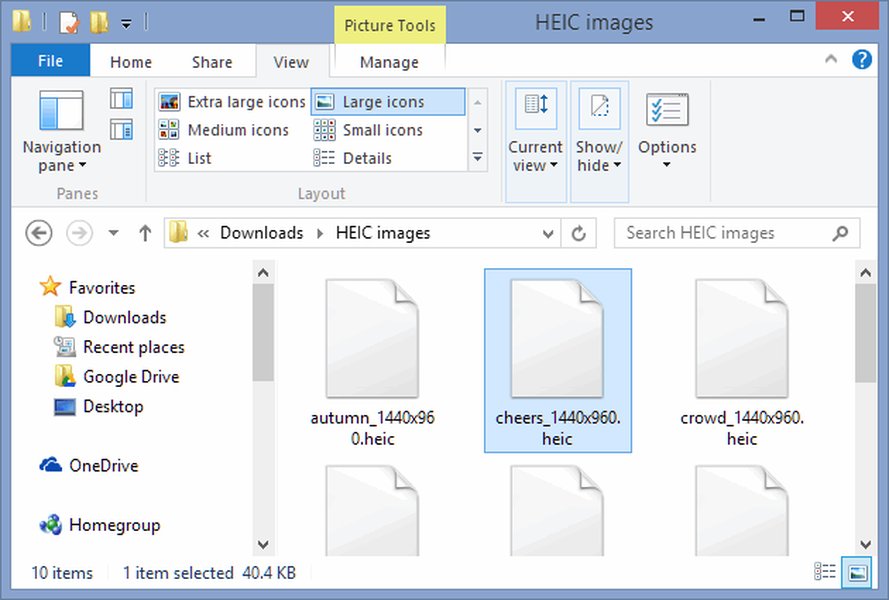
You tap a photo your friend sent, and instead of a picture you get a blank icon or an error message. Nine times out of ten, the culprit is a HEIC file. The format is perfectly fine, it just isn't understood everywhere yet. The good news is that every device has a simple fix, and this guide walks you through each one.
The quick answers
- Windows: install the free HEIF Image Extensions from the Microsoft Store, or use a tool like CopyTrans HEIC.
- Mac: double-click the file. Preview and Photos open HEIC out of the box on macOS High Sierra (10.13) and newer.
- iPhone: it just works in the Photos app. To stop shooting HEIC, switch the camera to "Most Compatible".
- Android: most phones running Android 9 or later open HEIC already. If yours doesn't, a free viewer or converter app solves it.
In this guide
What a HEIC file is, and why you keep running into it
HEIC stands for High Efficiency Image Container. Apple switched to it as the default photo format on iPhones and iPads with iOS 11, and the reason is simple: a HEIC photo is usually about half the size of a JPEG with no visible drop in quality. On a phone that fills up fast, that adds up to a lot of saved space.
The catch is compatibility. JPEG has been around for decades and every app on earth reads it. HEIC is newer, so older software, some websites and plenty of non-Apple devices don't know what to do with it. That's the whole problem, and it's easy to get around.
How to open HEIC files on Windows
Windows 10 and Windows 11 can open HEIC, but they often need a small add-on first. You have a few good options.
Option 1: Install the Microsoft Store extensions
This is the cleanest route because it's official and it plugs straight into the Photos app.
- Open the Microsoft Store and search for HEIF Image Extensions.
- Click Install. It's free.
- Double-click any HEIC file. It should now open in Photos.
If a file still refuses to open, you may also need the HEVC Video Extensions. Microsoft sells that one for a small fee, although some PCs come with it already installed, so check before paying.
Option 2: Use a third-party tool
If you'd rather not deal with the Store, these work well:
- CopyTrans HEIC for Windows. A free tool that adds HEIC support to File Explorer. You get thumbnails, you can open files in whatever photo viewer you like, and a right-click converts any photo to JPG.
- Desktop converters. Handy when you have hundreds of photos, since most of them can convert a whole folder in one go.
- Online converters. Fine for a single holiday snap, but think twice before uploading private photos to a site you know nothing about.
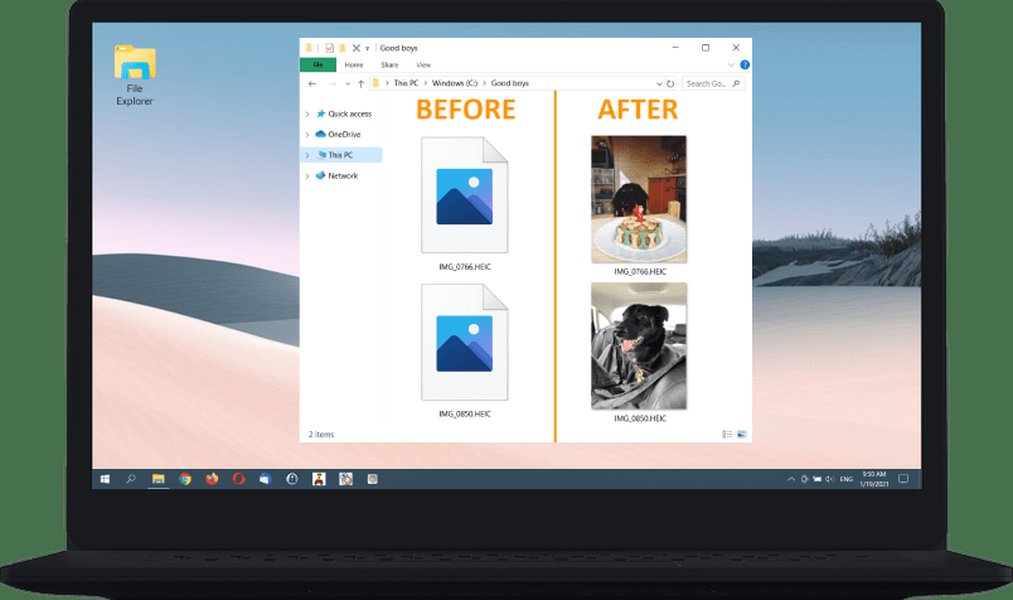
CopyTrans HEIC adds thumbnail previews and a right-click convert option to File Explorer.
How to open HEIC files on a Mac
Apple built the format, so macOS handles it without any fuss. On macOS High Sierra (10.13) or later, you can open HEIC files two ways:
- Preview. Double-click the file. From there you can edit it or go to File > Export and save a JPG or PNG copy.
- Photos. Import the files and they join your library like any other picture.
Running something older than High Sierra? Updating macOS is the easiest fix. If that isn't possible, upload the photos to a cloud service such as Dropbox and view them in your browser.
HEIC on iPhone and iPad
Nothing to install here. Every photo you take opens in the Photos app, full stop. The only decision is whether you want to keep shooting in HEIC.
- Switch to JPG for new photos. Go to Settings > Camera > Formats and choose Most Compatible. This only affects photos you take from now on. Your existing HEIC photos stay as they are.
- Sharing usually takes care of itself. When you send a photo through Mail, Messages or AirDrop to a non-Apple device, iOS often converts it to JPG along the way.
- Moving photos to a PC. In Settings > Photos, set "Transfer to Mac or PC" to Automatic and iOS will convert photos to a compatible format as it copies them.
The trade-off is storage. JPEG files are larger, so choosing Most Compatible means your photo library will take up more room.
How to open HEIC files on Android
Android 9 and newer include basic HEIC support, so on a recent phone the Gallery app or Google Photos will often show these files just fine. Where people get stuck is older phones, certain file managers, and apps that simply don't recognize the format.
If a HEIC photo won't open, try this:
- Open Google Photos and see if the picture displays there.
- If not, search the Google Play Store for "HEIC viewer" or "HEIC to JPG converter" and install a well-reviewed app.
- Open the photo in that app, or convert it to JPG so you can use it anywhere.
Many of these apps can batch-convert, which saves a lot of time if you were sent a whole album.
A short video tutorial on viewing and converting HEIC photos on Android.
Converting HEIC to JPG: which method to pick
If you just need the photo to work somewhere else, converting it to JPG is the surest fix. Here is the simplest route on each device.
| Device | Easiest way to convert | Good to know |
|---|---|---|
| iPhone / iPad | Set the camera to Most Compatible, or let iOS convert when you share or transfer. | Prevents the problem before it starts. |
| Mac | Open in Preview, then File > Export. | You pick the format and the quality. |
| Windows | Right-click with CopyTrans HEIC, or use a desktop converter. | Great for converting many files at once. |
| Android | A HEIC to JPG converter app from Google Play. | Many apps support batch conversion. |
HEIC or JPG: which should you keep?
If you mostly stay inside the Apple world, HEIC is the better deal because it saves space and looks just as good. If you regularly share photos with people on other devices, upload to older websites, or edit in older software, JPG avoids headaches. Plenty of people keep HEIC on the phone and convert only when they need to.
Frequently asked questions
Why does Apple use HEIC instead of JPG?
Is HEIC better quality than JPG?
Can I stop my iPhone from taking HEIC photos?
Are online HEIC converters safe?
Why does Windows sometimes ask for the HEVC Video Extensions?
Final thoughts
HEIC looks like a hassle the first time a photo won't open, but it really isn't one. Windows needs a free extension, Macs and iPhones open it natively, and most Android phones have it covered too. And whenever a file gives you trouble, converting it to JPG takes about ten seconds. Pick the method that fits your device, and your photos will open wherever you need them.
Sources and further reading
- A guide to HEIC files on iPhone and other Apple devices (Laptop Mag)
- How to open HEIC images on your Android phone or tablet (Android Police)
- HEIC files: how to create, edit and open them (Adobe)
- Free ways to open HEIC photos on Windows (CopyTrans)
- How to open HEIC and HEIF files in Windows (Lifewire)
- How to open HEIC files on your Mac (iDownloadBlog)