
Unlock Peak Mac Performance: The Terminal Apps That Conquer Memory Hogs
Discover powerful command-line tools and terminal emulators designed to reclaim your Mac's resources and supercharge your workflow.
Key Insights into Mac Performance Optimization
- Modern Terminal Emulators Offer Superior Performance: Third-party terminal applications like Ghostty, iTerm2, and Warp provide advanced features, customization, and often leverage GPU rendering for faster, more efficient operations than the default macOS Terminal.
- CLI Tools Replace Resource-Intensive GUI Apps: Many common tasks traditionally handled by memory-hungry graphical applications can be performed with lightweight command-line interface (CLI) tools such as ncdu, yt-dlp, and aria2, significantly reducing RAM usage.
- Optimized Workflow for Developers and Power Users: The combination of a high-performance terminal emulator and specialized CLI utilities streamlines development, system administration, and daily tasks, enhancing productivity by minimizing resource overhead.
In the evolving landscape of macOS, users are increasingly seeking ways to optimize system performance and reduce memory consumption. A significant area of focus for this optimization lies within the command-line environment. While the default macOS Terminal is functional, a new generation of terminal emulators and command-line tools offers enhanced capabilities, speed, and efficiency, allowing users to replace memory-intensive graphical applications and streamline their workflows.
This comprehensive guide delves into the top Mac terminal applications and command-line tools that are transforming how users interact with their systems, ultimately leading to a more responsive and efficient macOS experience.

A modern terminal interface showcasing advanced features and customization options.
The Rise of Advanced Terminal Emulators
The default macOS Terminal application serves its purpose, but for power users, developers, and system administrators, it often falls short in terms of features, performance, and customization. Third-party terminal emulators have emerged as robust alternatives, providing a more versatile and efficient environment for command-line operations.
Leading Terminal Emulator Contenders
- Ghostty: Praised for its speed and native macOS integration, Ghostty utilizes GPU rendering and AppKit/SwiftUI to deliver a fluid and responsive experience. It's often recommended as an excellent default replacement for general users due to its performance and modern feel.
- iTerm2: A long-standing favorite, iTerm2 is renowned for its extensive feature set. It offers functionalities like split panes, robust search capabilities, session restoration, and deep customization options, making it a powerful tool for complex workflows.
- Warp: Designed with modern developers in mind, Warp stands out with its AI assistance, an IDE-like input editor, and collaborative features. Its intelligent command completion and integrated documentation aim to boost productivity significantly.
- Alacritty: Built for raw performance, Alacritty is a GPU-accelerated terminal emulator written in Rust. Its focus on speed and simplicity makes it a top choice for users prioritizing minimal latency and high throughput, often paired with tools like tmux for session management.
- Kitty: This emulator supports advanced features such as graphics rendering, comprehensive Unicode support, and true-color. Kitty's extensibility through "kittens" (small, scriptable modules) allows users to tailor it precisely to their needs.
- Tabby: A feature-rich and modern terminal, Tabby supports multiple shell instances within a single window. It also functions as a versatile SSH client with advanced connection management capabilities, appealing to users who frequently work with remote servers.
- Commander One: While primarily a dual-pane file manager, Commander One integrates a terminal that automatically opens in the current directory. This integration streamlines workflows that involve frequent switching between file operations and command-line tasks.
These advanced terminals not only offer superior performance but also enhance productivity through better tab and pane management, improved customization, and specialized features for various technical tasks, particularly those involving SSH and development tools.
Evaluating Terminal Emulator Strengths
To better understand the distinct advantages of various terminal emulators, let's look at an opinionated analysis comparing their key attributes. This radar chart illustrates how different emulators might score across critical categories important to a Mac user.
[مخطط رادار تفاعلي: مقارنة محاكيات الطرفية]
This radar chart provides a comparative overview of popular Mac terminal emulators, assessing their strengths in areas like performance, customization, feature set, AI integration, and native macOS feel. Scores are based on common user feedback and typical use cases.
Command-Line Tools: Lightweight Replacements for Memory Hogs
Beyond the terminal emulator itself, a significant reduction in memory usage can be achieved by replacing graphical applications with their command-line interface (CLI) counterparts. These CLI tools are designed for efficiency and often perform specific tasks with minimal resource overhead.
Essential CLI Tools for Resource Optimization
- ncdu: This tool serves as an excellent replacement for graphical disk-space analyzers. It quickly scans and visualizes folder sizes directly within the terminal, allowing users to identify and manage large files without the heavy resource footprint of a GUI application.
- yt-dlp: A highly versatile command-line utility for downloading videos from YouTube and many other platforms. It effectively supplants feature-rich desktop video downloaders, consuming significantly less RAM while offering extensive customization options for downloads.
- Taskwarrior: For task management, Taskwarrior provides a text-based, efficient solution. It stores tasks in plain text, eliminating the need for bulky desktop task managers and ensuring minimal memory usage, making it ideal for users who prefer a streamlined approach to productivity.
- ranger: This Vim-style file manager offers a powerful and efficient alternative to Finder or other graphical file browsers. It allows for quick navigation, file manipulation, and previewing, all within the terminal, drastically reducing the memory footprint associated with file management.
- aria2: As a multi-protocol download accelerator, aria2 replaces traditional download managers that can be resource-intensive. It supports HTTP/HTTPS, FTP, BitTorrent, and Metalink, providing fast and efficient downloads with a far lower resource impact.
These command-line utilities are specifically chosen for their ability to perform common, resource-intensive tasks in a lightweight manner. By adopting them, users can free up gigabytes of RAM that would otherwise be consumed by their graphical equivalents.
The Synergistic Power of Terminal Emulators and CLI Tools
The true power of optimizing your Mac's command-line environment comes from combining a robust terminal emulator with these efficient CLI tools. The terminal provides the platform, and the CLI tools execute the tasks with minimal overhead.
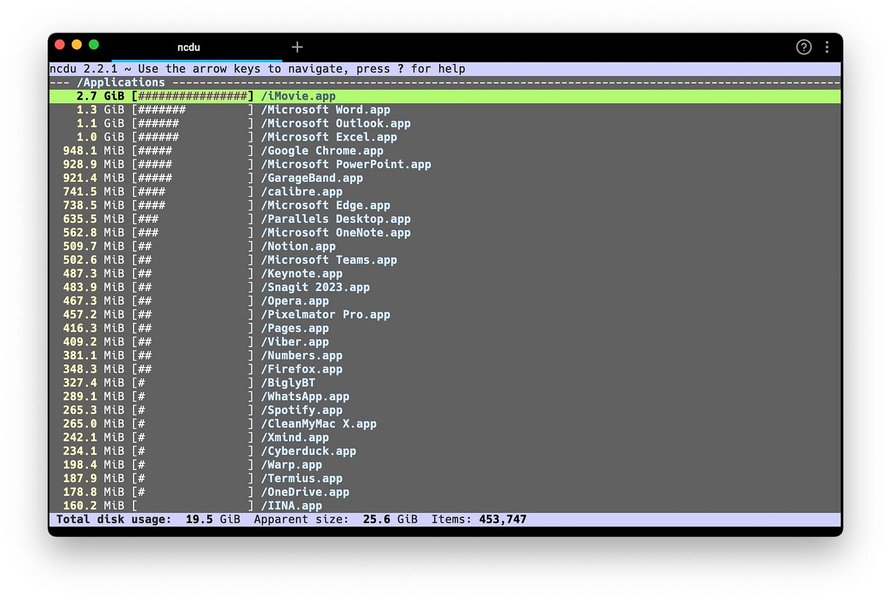
A display of various command-line tools demonstrating their text-based efficiency.
Choosing the Right Tools for Your Needs
Selecting the best combination depends on individual preferences and specific use cases. Some users might prioritize raw speed (e.g., Alacritty with tmux), while others might value extensive features and AI assistance (e.g., Warp). The common thread is the pursuit of efficiency and reduced memory consumption.
[مخطط ذهني: تحسين أداء Mac عبر محاكيات الطرفية وأدوات CLI]
This mindmap illustrates the interconnected concepts of Mac performance optimization through advanced terminal emulators and lightweight command-line tools, highlighting their respective contributions and overall benefits.
Memory Savings: CLI vs. GUI Applications
The impact of replacing graphical applications with their command-line equivalents can be substantial in terms of memory savings. This bar chart provides an illustrative, opinionated comparison of memory usage for common tasks when performed with traditional GUI applications versus efficient CLI tools.
This bar chart visually compares the estimated memory footprint of typical GUI applications versus their lightweight command-line counterparts for various common computing tasks. It illustrates the significant RAM savings achievable by opting for CLI tools.
Comparative Table of Terminal Emulators and CLI Tools
To further consolidate the information, the following table summarizes the key features and primary benefits of the discussed terminal emulators and CLI tools, helping you decide which ones best fit your workflow.
| Category | Tool Name | Key Features / Function | Primary Benefit | Target User |
|---|---|---|---|---|
| Terminal Emulator | Ghostty | GPU rendering, Native macOS feel | Exceptional speed and responsiveness | General users, Developers |
| Terminal Emulator | iTerm2 | Split panes, Extensive customization, Session restoration | Advanced productivity features | Power users, Developers |
| Terminal Emulator | Warp | AI assistance, IDE-like input, Collaboration | Modern, AI-enhanced development workflow | Modern Developers |
| Terminal Emulator | Alacritty | GPU-accelerated, Written in Rust | Maximum performance and minimal latency | Performance enthusiasts, CLI purists |
| Terminal Emulator | Kitty | Graphics support, Unicode, Extensible "kittens" | Rich feature set with extensibility | Advanced users, Customizers |
| CLI Tool | ncdu | Disk usage analysis with visual representation | Quickly identifies large files/folders, low RAM use | Anyone managing disk space |
| CLI Tool | yt-dlp | Video download from YouTube and many sites | Lightweight and versatile video downloading | Media consumers, Content creators |
| CLI Tool | Taskwarrior | Text-based task management | Efficient to-do lists with minimal overhead | Productivity hackers, Minimalists |
| CLI Tool | ranger | Vim-style file browsing | Fast, keyboard-driven file management | CLI enthusiasts, System administrators |
| CLI Tool | aria2 | Multi-protocol download acceleration | High-speed, resource-efficient downloading | Anyone downloading large files |
Deep Dive: Boosting Mac Performance with CLI Tools
Understanding how to leverage command-line tools can significantly enhance your Mac's speed and efficiency. The provided video offers valuable insights into practical applications of these tools for performance testing and general system optimization.
This video, titled "6 AWESOME CLI Tools for Mac & Linux Performance Testing," demonstrates practical command-line utilities that can be used to monitor and optimize system performance on macOS and Linux. It's highly relevant to our discussion as it showcases real-world applications of CLI tools in reducing resource consumption and improving overall system responsiveness. The video provides a hands-on perspective on how to integrate these powerful tools into daily workflows to keep your Mac running smoothly.
Frequently Asked Questions
Conclusion
Optimizing your Mac's performance by replacing memory-intensive applications with efficient terminal emulators and lightweight command-line tools is a highly effective strategy for enhancing speed and productivity. Tools like Ghostty, iTerm2, and Warp offer feature-rich and high-performance environments for interacting with your system, while CLI utilities such as ncdu, yt-dlp, Taskwarrior, ranger, and aria2 provide resource-friendly alternatives for common tasks. By embracing these powerful command-line solutions, users can reclaim valuable RAM, streamline their workflows, and enjoy a more responsive and efficient macOS experience. The synergy between a robust terminal emulator and purpose-built CLI tools empowers users to tackle complex operations with unparalleled speed and minimal system overhead.
Recommended Further Exploration
- What are the most feature-rich terminal emulators for macOS in 2026?
- How can command-line tools enhance a developer's workflow on Mac?
- What are other effective methods to reduce RAM usage on macOS?
- How can I customize iTerm2 to maximize my productivity?